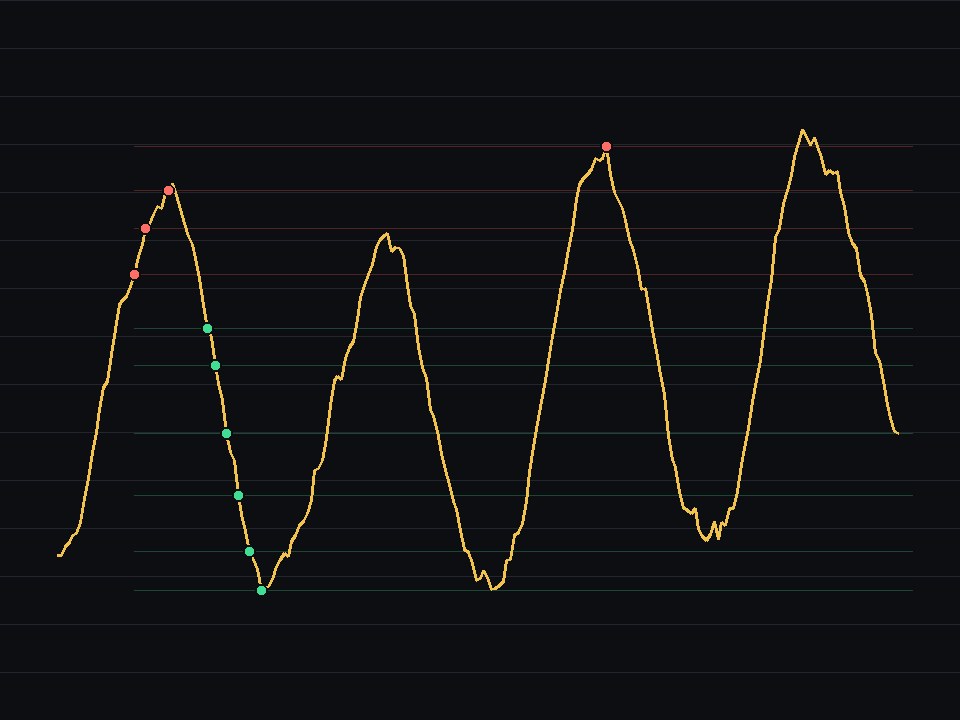
Four Rules
Each basket starts with a long and a short trade opened together, with no directional guesswork.
When price moves one interval beyond the furthest trade on a side, it adds another trade on that side.
When the basket's net profit, including swaps and commissions, reaches the take profit threshold, all trades close and the next basket opens immediately.
Standard mode allows up to 18 trades per side, with no unlimited doubling.
How It Trades, in Plain English
- Start: after the previous basket closes, immediately open a long and a short trade, both at the base lot size.
- Add trades: add a long trade after price falls $7.7, or a short trade after it rises $7.7, measured from the furthest trade on that side.
- Double lots: the first 11 trades on each side use the base lot size. From trade 12, lot sizes increase according to the doubling schedule.
- Take profit: close all trades when the basket's net profit reaches $20 at 0.01 lots. Doubling the lot size also doubles the take profit threshold.
- Panel: the Chinese-language panel shows the basket's profit and loss, take profit progress, long and short trade details, and daily profit on one screen. Pause new baskets or close positions with one click.
Choose Your Mode
The default mode. Uses the same rules as the live account, with an added trade cap on each side.
Exactly matches the original live account.
Same as Standard, with no new baskets on Friday evenings or during wide spreads, reducing baskets held over weekends.
Enter your own lot size (default 0.01; the doubling schedule and take profit threshold scale with it). No minimum capital requirement.
Backtest
Standard mode · Starting capital $10,000 · 0.01 lots
2026-06-01 to 2026-10-15
Trades over the same period
About 30 trades per trading day on average
Standard mode · Tick-by-tick market replay
2026-01-29 to 2026-10-23
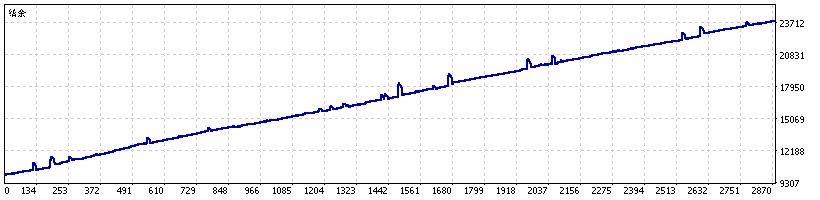
The image above is the original MT5 Strategy Tester balance curve (1-minute OHLC, figures unchanged), using Standard mode, starting capital $10,000, and 0.01 lots, based on an ECN account. Backtests do not predict future returns. Try running it with a trial key first.
How to Install
- MT5 → Tools → Options → Expert Advisors: check "Allow WebRequest for listed URL" and add https://xdg.eaea.ai .
- Place the EA in MQL5\Experts, open a gold chart, and drag the EA onto it. Use one instance per chart; change the magic number for a second chart.
- In Inputs, paste the activation key, choose a mode, and enter the base lot size. You can also paste the activation key into the panel. Parameters such as spacing, take profit, and the doubling schedule are delivered from the cloud by mode and do not appear in Inputs.
- You're ready when the bottom of the panel shows "License Valid" and "Mode Applied".
Who It's For
For those who want the EA to trade basket by basket, with frequent trades and no need to watch the market.
For those who want to manage every trade manually, or whose capital is too small to withstand lot doubling against price moves.